Display guide

Help your customers see that You are offering them all the popular FOXPOST services. The guide helps you integrate the banners, videos, image elements you can find here, with your online shop.

Logo and image elements

Rules of use
The FOXPOST logo may be used with a white or red background, in the following two versions. Make sure to use the slogan and the logo proportionately. Do not distort the logo horizontally or vertically. Make sure to retain the appropriate proportions used for the head of the fox, relative to the typography.

advertising Banners

Use our banners to show your customers that from now on they can opt for a new, convenient and innovative way to receive their parcels, and increase your sales.

Horizontal banners

Copy and paste this HTML code into your online shop page code to insert the banner:
<a href="YOUR_INTERNAL_PAGE"><img src="https://foxpost.hu/uploads/downloads/images/FOXPOST_2021_648x186_01.jpg" alt="FOXPOST Parcel locker" width="648" height="186" /></a>
Copy Source Code
Copy and paste this HTML code into your online shop page code to insert the banner:
<a href="YOUR_INTERNAL_PAGE"><img src="https://foxpost.hu/uploads/downloads/images/FOXPOST_2021_648x186_02.jpg" alt="FOXPOST Parcel locker" width="648" height="186" /></a>
Copy Source Code
Copy and paste this HTML code into your online shop page code to insert the banner:
<a href="YOUR_INTERNAL_PAGE"><img src="https://foxpost.hu/uploads/downloads/images/648x186_banner_nevarjafutarra.jpg" alt="FOXPOST Parcel locker" width="648" height="186" /></a>
Copy Source Code
Copy and paste this HTML code into your online shop page code to insert the banner:
<a href="YOUR_INTERNAL_PAGE"><img src="https://foxpost.hu/uploads/downloads/images/FOXPOST_2021_640x360_01.jpg" alt="FOXPOST Parcel locker" width="648" height="186" /></a>
Copy Source Code
Copy and paste this HTML code into your online shop page code to insert the banner:
<a href="YOUR_INTERNAL_PAGE"><img src="https://foxpost.hu/uploads/downloads/images/FOXPOST_2021_640x360_02.jpg" alt="FOXPOST Parcel locker" width="648" height="186" /></a>
Copy Source Code
Copy and paste this HTML code into your online shop page code to insert the banner:
<a href="YOUR_INTERNAL_PAGE"><img src="https://foxpost.hu/uploads/downloads/images/640x360_banner_nevarjafutarra.jpg" alt="FOXPOST Parcel locker" width="648" height="186" /></a>
Copy Source Code

Vertical banners

Copy and paste this HTML code into your online shop page code to insert the banner:
<a href="YOUR_INTERNAL_PAGE"><img src="https://foxpost.hu/uploads/downloads/images/FOXPOST_01.jpg" alt="FOXPOST Parcel locker" width="160" height="600" /></a>
Copy Source Code
Copy and paste this HTML code into your online shop page code to insert the banner:
<a href="YOUR_INTERNAL_PAGE"><img src="https://foxpost.hu/uploads/downloads/images/FOXPOST_02.jpg" alt="FOXPOST Parcel locker" width="160" height="600" /></a>
Copy Source Code
Copy and paste this HTML code into your online shop page code to insert the banner:
<a href="YOUR_INTERNAL_PAGE"><img src="https://foxpost.hu/uploads/downloads/images/160x600_banner_nevarjafutarra.jpg" alt="FOXPOST Parcel locker" width="160" height="600" /></a>
Copy Source Code

Interactive map

Our JavaScript based map widget is most suitable for online shop interfaces of unique design, to allow for the smoothest possible integration process.
Show me

Info video

How to pick up your parcel?
Copy and paste this HTML code into your online shop page code to insert the video:
<iframe width="560" height="315" src="https://www.youtube.com/embed/hN--QmxQVgY" frameborder="0" allowfullscreen></iframe>

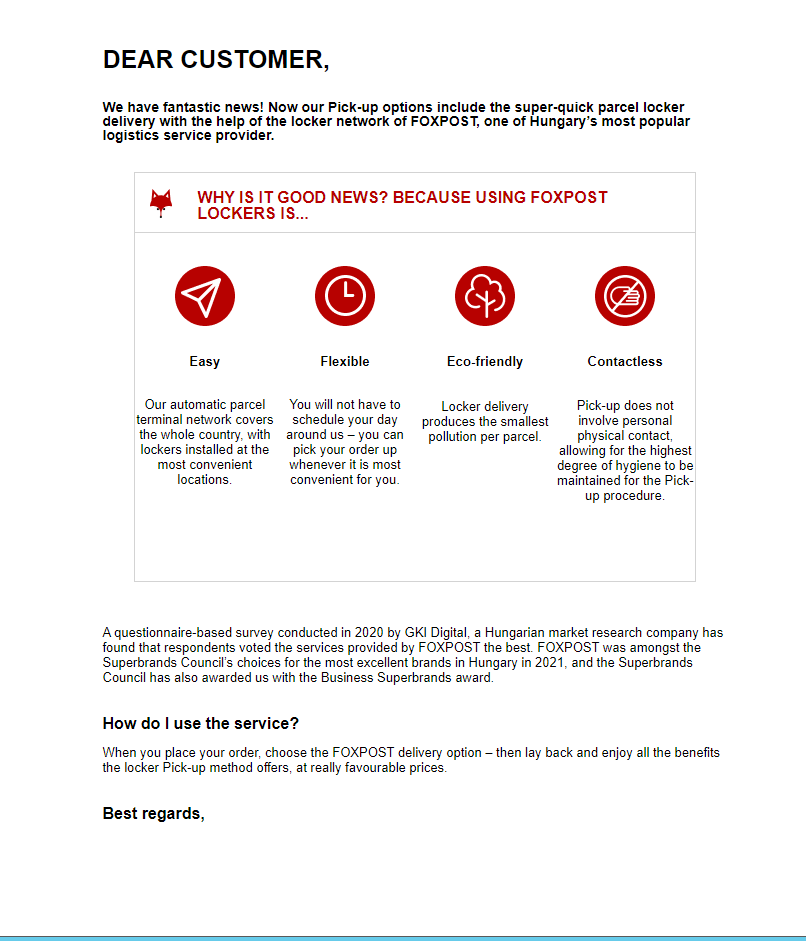
EDM template

These texts and graphical materials facilitate creating your own EDM email template.
Integration guide

Continue

Downloadable documents

General information for customers about FOXPOST
(Editable word file)
Download
A quick FOXPOST guide for customers
(Editable word file)
Download
Letter template with next day’s APT
(Editable word file)
Download
Letter template without next day’s APT
(Editable word file)
Download

Integration assistance, IT helpdesk

I want to fill in the form